Which Salesforce product am I using?

Beefree App is now RGE Studio!
The email design suite you already know and love just leveled up. We’re working hard to update our help center, but you still may see some references to the old product name.
Overview
Salesforce is a popular CRM used by many companies. The Salesforce environment includes many tools. It can be complex to navigate.
RGE Studio offers connectors for two Salesforce products:
- Salesforce Marketing Cloud
- Salesforce Account Engagement (formerly known as Pardot)
Not sure which Salesforce product you're using? This guide can help. You may need to be a Salesforce administrator to find this information.
Find your Salesforce product
- Sign in to your Salesforce account.
- Go to the Setup area.
- In the Quick Find search bar, search "company information." You should see only one result.
- Click Company Information. Scroll down to the section called Permission Set Licenses. You may need to expand this list. Use the Go to list link below the table.
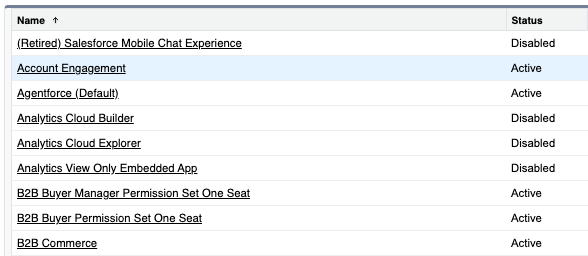
- Find the rows for Account Engagement and Marketing Cloud. Installed products show as active in the Status column.
The example below shows Account Engagement as active:
If you use a different product
You may be able to import your HTML manually. You can also fill out this form to request a new connector.
If you have any questions, feel free to contact us.
Comments
0 comments
Please sign in to leave a comment.