Inline CSS

Beefree App is now RGE Studio!
The email design suite you already know and love just leveled up. We’re working hard to update our help center, but you still may see some references to the old product name.
This article applies to the Email builder in all plans.
Overview
RGE Studio is a codeless solution for creating beautiful emails and landing pages. You can design in RGE Studio without any HTML or CSS knowledge. However, a basic understand of CSS can be helpful.
This article covers what you need to know about CSS in email development.
Sending Methods
Email clients can remove or ignore unsupported elements from your HTML source code. These behaviors can impact how your design looks in a recipient's inbox.
This is important to keep in mind if you plan to use an email client like Gmail or Outlook to send your emails. For example, say you design an email in RGE Studio that uses a web font. Then, you export the design to Outlook so you can send it. Outlook doesn't support the CSS needed for the web font, so it is removed from the design. Recipients see only your fallback font.
Professional email sending or marketing platforms offer a solution to this problem. They usually allow you to send an email without altering the source code. In this case, compatibility issues will not come up until the email reaches an inbox.
Some platforms have their own rules for how CSS should appear in HTML documents. In those cases, they may alter your source code to match their own rules.
You may experience something like this while using RGE Studio. You send a test email to yourself, and it looks perfect. Then you export the email to your sending platform and test it with that tool. Suddenly, you find rendering issues that you didn't see previously. This is a good indicator that something in the HTML has changed.
Some people think to reach out to their sending platform when this happens. Frequently, the sending platform will reply to tell you that the HTML needs to use inline CSS.
RGE Studio support hears this question often. The short answer is yes, RGE Studio uses inline CSS, but not always. Here's how RGE Studio turns your design into an HTML document.
If you already are comfortable with CSS, skip to the How RGE Studio Uses CSS section.
Types of CSS
When you export an email from the builder, you get an HTML document. This document comvines HTML 5, CSS, and VML syntax to build your email's source code. Most of this is HTML and CSS, while VML targets Outlook clients specifically.
In general, there are three ways to use CSS in web development:
- External CSS
- Embedded CSS
- Inline CSS
RGE Studio uses all three. However, only inline and embedded CSS will be present in every export file. External CSS will only appear when certain design elements are used.
Embedded CSS
Embedded (or internal) CSS allows you to create a stylesheet within the head tag of the HTML document. If you have experience with web development, this is a very popular method used for landing pages. It can be seen in the exported HTML of pages designed in RGE Studio.
You can find embedded CSS in the head of every document generated by RGE Studio. This embedded CSS creates the mobile version of your design. Here’s a snippet of embedded CSS from one of the templates available in the template catalog:
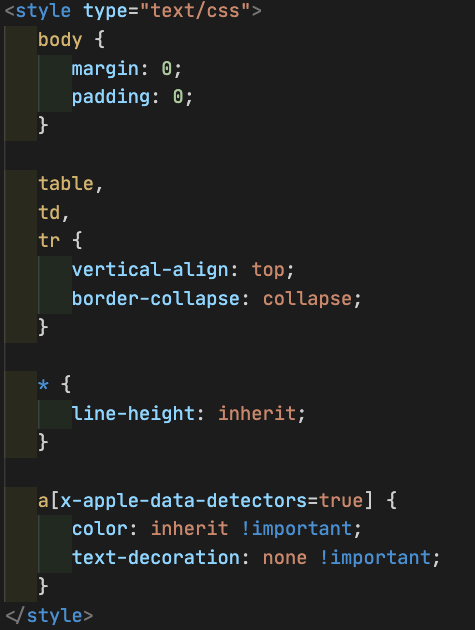
Embedded CSS has become more accessible over the last few years, but not all email clients support it. As a result, we’ve continued to use inline CSS to target things like text styles.
RGE Studio uses embedded CSS for media queries. These media queries create responsive design elements. These styles cannot be inlined, and they are critical for mobile responsiveness.
Inline CSS
Inline CSS is applied to a specific HTML element, rather than in the head of the document. If you’re new to coding languages, inline CSS looks a lot like HTML. For example, export an email from RGE Studio and look at the code for a single text content block. Much of this syntax is inline CSS:

Inline CSS has been the standard in email development for many years. It’s the best way to ensure consistency across email clients. Outside of email, though, inline CSS is not considered to be a best practice.
More email clients now support embedded CSS. RGE Studio uses both methods to prevent rendering issues in older clients. For more information on inline CSS in email development, Litmus has a great article on the topic.
Inline CSS does have a drawback. It requires repetition of the same syntax to apply consistent formatting. This can increase the size of HTML documents. This can create Gmail clipping no matter what sending method you use.
External CSS
External CSS allows you to use an separate stylesheet to apply styles. It's a popular method in general web development. In email development, very few clients support external CSS.
RGE Studio uses external CSS in one specific case: web fonts.
Web fonts are always delivered via an external stylesheet. This is because a web font is hosted on the web, not the device. RGE Studio inserts web fonts into exported HTML using the <link> method. This allows the recipient's device to download and display the web font.
If your design uses web fonts, you’ll find some external CSS like this in your HTML document:

Because of this, web fonts don’t render properly in all email clients. That’s why using web fonts in RGE Studio is optional. You can disable all web fonts in your workspace settings to avoid this issue.
How RGE Studio uses CSS
RGE Studio generates primarily inline CSS when you export an email. Different methods will be used for elements like mobile responsiveness and web fonts.
Some sending platforms may recommend using a CSS inliner tool. We do not recommend passing RGE Studio through these tools. These tools have the tendency to break mobile responsiveness. These tools can also scramble conditional comments as well. Although this syntax is not CSS, this change can cause the email to break in Outlook.
We recommend using a sending platform that keeps your HTML structure as-is. Note that some sending platforms come with built-in inliner tools. There may also be an option that allows you to turn it off.
If you have any questions, feel free to contact us.
Comments
0 comments
Please sign in to leave a comment.