How can I upload a pdf and insert a link to it to my design?

Beefree App is now RGE Studio!
The email design suite you already know and love just leveled up. We’re working hard to update our help center, but you still may see some references to the old product name.
This article applies to the Email and Pages builder in all plans.
Overview
You can use the file manager to upload several different file types. When you open it from an image block, it only shows image files. These include JPG, PNG, and GIF.
You cannot insert a PDF as an image content block. When you link to a PDF, the person who clicks it is prompted to download it to their device. The PDF is hosted and subject to CDN usage. Use one of the methods below to add a PDF link to your design.
Link file via button
Select a button block. In the Action settings, click Link file below the URL field.
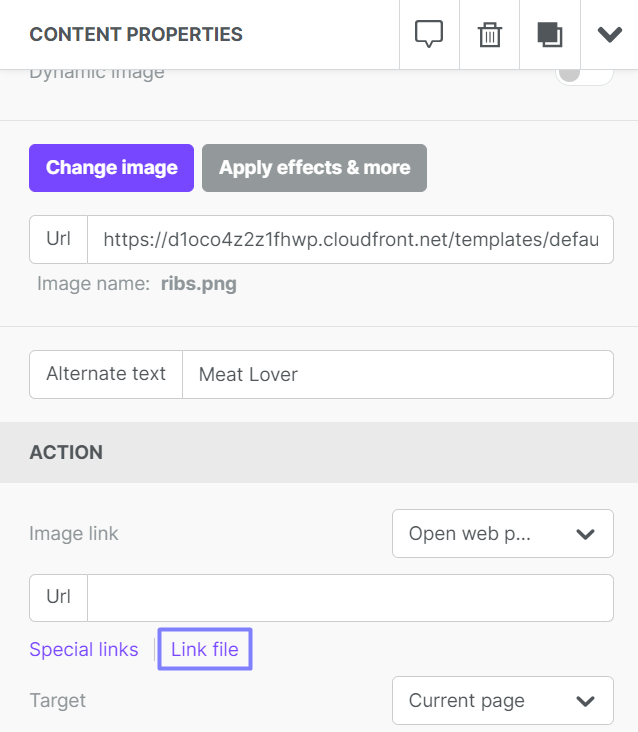
Upload a new file or select an existing one. Files are limited to 20 MB each. Click Insert to create the link.

This option is also available in the Action settings of an image block.
Link file in hyperlinks
In a text-based content block (Paragraph, List, or Title), use the Insert/edit link dialog. Select File Manager from the Link Type drop-down.
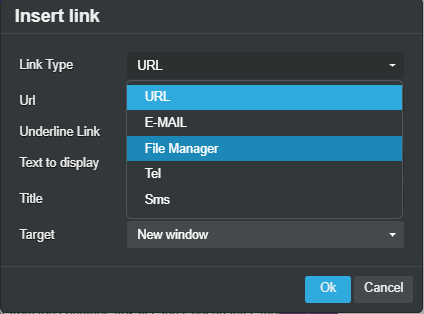
Upload a new file or select an existing one. Selecting a file creates the link.
If you have any questions, feel free to contact us.
Comments
0 comments
Please sign in to leave a comment.