Migrating to RGE Studio

Beefree App is now RGE Studio!
The email design suite you already know and love just leveled up. We’re working hard to update our help center, but you still may see some references to the old product name.
This article applies to all plans. However, some features may be limited depending on your plan.
Overview
Moving to RGE Studio from another platform? We offer two ways to help you bring your existing emails into your new account.
- Coming from Unlayer Studio? Use our courtesy JSON conversion service.
- Coming from another platform? Use the HTML Importer.
Migrating from Unlayer Studio
We offer a JSON conversion service for customers moving from Unlayer Studio. A JSON is the file Unlayer uses to store each design. It is different from an HTML file.
This converter was built for Unlayer's JSON format only. It does not work with exports from other platforms. Moving from another email design platform? Our Sales team would be happy to discuss other options with you.
Export Your Designs
You will need to export the JSON for each email or page from Unlayer Studio first.
- Open the design in Unlayer Studio.
- Open the template editor.
- Find the option to export the JSON. You can access this from within the editor.
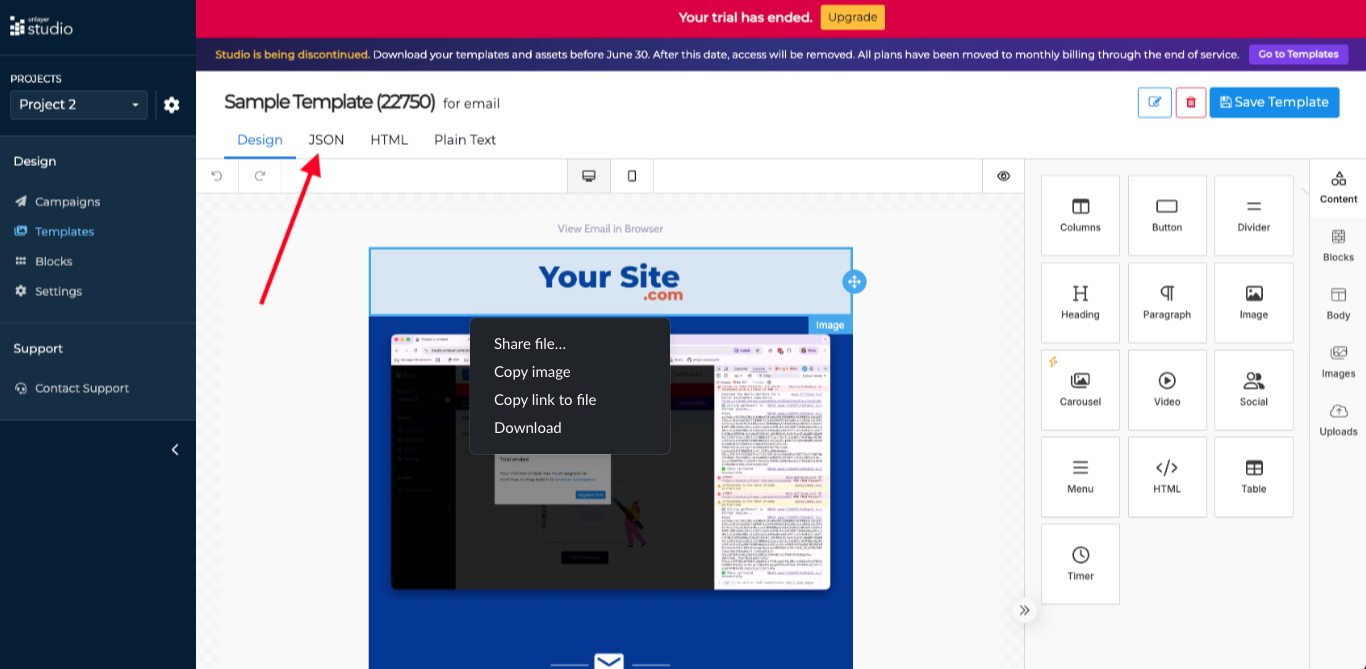
- Download the JSON file.
- Repeat for each design you want to migrate.
Submitting for Conversion
Share your JSON files with our support team. We will run them through the converter and add your designs to your RGE Studio account.
You must be on the Professional plan or higher to use this service.
Migrating from Other Platforms
Does your platform not offer a JSON export? Use the HTML Importer to bring your designs into RGE Studio. See the HTML Importer article for full instructions and limitations.
Migration Services
Custom migration solutions are available. This includes expanded HTML import limits and hands-on support. Schedule a call with our sales team to learn more.
If you have any questions, feel free to contact us.
Comments
0 comments
Please sign in to leave a comment.