Managing your RGE Studio subscription

Beefree App is now RGE Studio!
The email design suite you already know and love just leveled up. We’re working hard to update our help center, but you still may see some references to the old product name.
This article applies to all plans. However, some features may be limited or unavailable on the Starter plan.
Overview
Follow the steps below to manage your RGE Studio subscription. You can:
- Update your organization name
- Update your billing information
- Change your plan
The account owner manages subscription information. For more information, see User roles & permissions.
To manage additional user fees, see Multi-user support and management in RGE Studio.
Navigating the Subscription page
All RGE Studio users have a drop-down menu in the top right corner of their dashboard. Account owners can use this menu to find the Subscription page. For more information, see Understanding your Subscription Details.
The options described on this page are found in the Overview tab of the Subscription. They are available to the account owner only.
Updating your billing information
- Click Manage organization to change your organization name. This is the organization name you see inside RGE Studio.
-
On a paid plan, you see the Edit Card and Edit billing details options.

Click Edit billing details to update:
- Billing email
- Company name
- Address
- VAT
This information appears on invoices. Fill out the modal and click Confirm.

To update the credit card on file, click Edit card details. Fill out the modal and click Update credit card info.

Changing your plan
- Navigate to the Subscription page.
- Click the Change plan button in the top-right corner.
-
A pricing overview page opens. Your current plan is highlighted.

-
Select Select plan or Subscribe now under the plan you want. You may also see an option to start a free trial.

- Your cart opens. You can add Additional seats or Workspaces at the bottom of the page. Additional Workspaces are available on the Business plan. Click Proceed To Checkout.
- At Checkout, review your Order Summary. Click Pay & Subscribe.
Upgrades
If you upgrade to a higher plan, the change takes effect immediately. If you switch from one paid plan to another, the upgrade cost may be prorated. Proration is based on the time elapsed in your billing period.
You can review future charges before you proceed. Click Credits applied in your Order Summary.
Switching from monthly to annual billing works like an upgrade. The change takes effect immediately.
Downgrades
A downgrade takes effect at the end of your current billing period. Switching from annual to monthly billing works like a downgrade. Your subscription changes to monthly billing when your billing period resets.
When you downgrade to a different plan, you see a summary of how your plan changes. For more information about downgrades, see How to Downgrade.
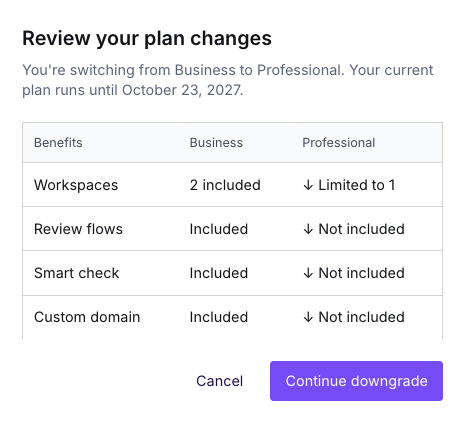
To continue, click Continue downgrade. Then, follow the checkout prompts to complete the change. You will see a "Pending downgrade" notice on the Subscription page until the end of the billing period.
Canceling your RGE Studio subscription
Canceling a paid subscription is permanent. Your account assets are deleted from our servers immediately after cancellation. For more information, see What happens if I cancel my subscription?
To keep your account assets, we recommend downgrading to the Starter plan.
If you no longer need your designs, click Cancel my subscription. If you are on a paid plan, you will also see the option to downgrade.

Use the text field to share some feedback, and click Cancel my subscription to confirm.
Your account will remain available until the end of the current billing period. During that time, you will see the option to Resume subscription.
If you have any questions, feel free to contact us.
Comments
17 comments
Hi! My company does not allow monthly fees. Is there a way you can send me an annual amount invoice?
Hi Ariane, we only offer a monthly subscription to BEE Pro at the moment, but we're indeed looking at offering a yearly plan in the future. I'll keep you (and the community) posted once this becomes available.
Hi, yesterday I wanted to upgrade my account and I filled in all required fields. Nothing happened and I never got a confirmation or anything.
Before I do everything again, could you maybe check if everything went well?
Hi Lisa, we're not sure what might have happened. Thanks for updating your account. We reviewed your subscription and reactivated it for you. You can now log in at https://pro.beefree.io/login/
I'm having trouble updating my payment details due to a bug on the zip code since it's not a us zip code.
Hi Israel, we're sorry for the inconvenience. In some cases there are indeed issues with our payment gateways (Chase Paymentech). We'll look up your subscription and get it resolved. If needed, we'll contact you through our support ticket system.
Hi, can I renew my account by paying with a different method than the credit card? For example Paypal or Bank Transfer?
Hi Cosimo, thanks for your comment. We do not accept these payment options for the time being.
Hi,
I would like to subscribe to Bee Pro monthly and I would probably subscribe two months only in a year since I don't use Bee Pro frequently. Therefore, I have the following questions:
(1) If I have set a custom domain for my emails/page, but then I downgrade my account to a free plan, then what would happen to the custom domain I set before? Would it be the same or change to a default domain set by Bee Pro.
(2) A free account allows a maximum of 10 designs of email/pages so if I upgrade to a Team plan and create more than 10 designs, but after that I downgrade to a free plan, then what would happen to those exceeding designs? Would it be deleted or kept in my account and reactivate after I update to a Team plan again?
Hi Lung. Thanks for your questions and for choosing our editor! Please note that you can set a custom domain if you are on an Enterprise plan. Instead, you can set a subdomain if you choose to upgrade to a Team plan (see the full article here). That said, if you decide to downgrade from Enterprise to the Free plan, a modal will appear asking you to confirm to cancel your custom domain. If you downgrade from a Team to a Free plan, you will be asked to cancel the customized subdomain. So in both cases, it will change to the default domain.
About the limits of 10 designs, when you downgrade from Team to Free, we will show you the latest designs you worked on. The rest of them will be 'frozen' but they can be available again if you decide to upgrade again.
I hope this information was helpful. Let us know if you need further explanations!
Hello,
I have more users added to my subscription than active users on my team. How can I downgrade my paid account to remove the additional users and the charge associated with having them on my account?
Thank you,
Kate
Is there a way to add more viewers?
Hi Kate and Kristy!
Thanks for being apart of the Beefree community; we're happy to have you here!
To first answer your question Kate, this section of our 'Multi-user support and management in Beefree' article in our Help Center gives great information on accomplishing this!
To answer your question, Kristy, regrettably, we only have a limit of four viewers in our Team subscription and don't currently have the option to purchase more viewers at this time. However, this option does apply to our Enterprise plan in order to best fit your organization's needs! You can find more information on the difference between the two plans in the following Help Center article: Beefree - Team and Enterprise Plans
For future reference, you can also review the following Help Center article for more information on Viewers right here.
I hope this information helps you both! Feel free to respond if you have any follow-up questions; we'll be happy to assist further!
Hi!
I have just made a monthly subscription, but when I receive the invoice I see that I have put the wrong data, and I need the correct invoice with the company's VAT number.
I attach an image so that you can understand how it has arrived to me and know how I can get the correct invoice with the name and cif of the company.
Hello Quique!
I will post a ticket on your behalf so that we can help you with the matter.
Hello. I am reaching out from our account. The `person who set it up is no longer on the team, and we are trying to update the payment info to activate the account. But when my teammate with the CC info tries, it gives him an error.
Hello! We are sorry if you are having this issue. I've opened a ticket for you to check more details about your CC. Please check your inbox soon!
Please sign in to leave a comment.